How to use frame and grid functions (python,tkinter)


Python
library
pip

MeCab

Common
class

pickle

read/readline

numpy
asfarray

digitize

expit

linalg.solve

meshgrid

mgrid

ndmin

pad

poly1d

polyfit

prod

shape

matplotlib
figure

pcolormesh

scatter

pytorch
BCELoss, MSELoss

device

Embedding

TensorDataset, Dataloader

RNN, LSTM
scikit-learn
SVC

GaussianNB

scipy
interpolate
tkinter
postscript

image display

frame, grid

Crop Image

other
linear interpolation

Hysteresis switch

Square/Triangle wave

OpenAI gym
CartPole-v0

By purpose
1 of K Coding


Release date:2023/12/29         

In Japanese


■Description of frame, grid functions

Set the widget framework.

■Example using frame, grid function

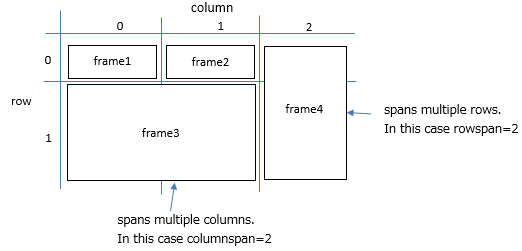
Specify the grid and place the frame as shown below.


import tkinter

app = tkinter.Tk()
app.geometry("400x400")

# frame creation
frame1 = tkinter.Frame(app,)
frame2 = tkinter.Frame(app,)
frame3 = tkinter.Frame(app,)
frame4 = tkinter.Frame(app,)

frame1.grid(column=0,row=0)
frame2.grid(column=1,row=0)
frame3.grid(columnspan=2,column=0,row=1)
frame4.grid(rowspan=2,column=2,row=0)

# Widget placement
button = tkinter.Button(frame1,text="button",)
button.pack()

label = tkinter.Label(frame2,text="label")
label.pack()

canvas = tkinter.Canvas(frame3,width=300,height=300,bg="gray")
canvas.pack()

canvas1 = tkinter.Canvas(frame4,width=50,height=330,bg="blue")
canvas1.pack()

app.mainloop()


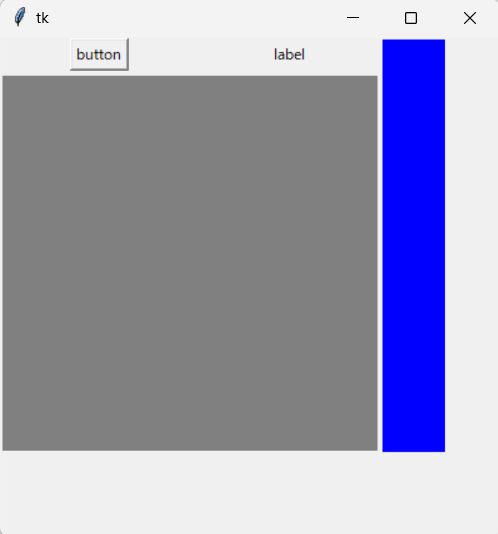
The results are as follows.


List of related articles


Python
library
pip

MeCab

Common
class

pickle

read/readline

numpy
asfarray

digitize

expit

linalg.solve

meshgrid

mgrid

ndmin

pad

poly1d

polyfit

prod

shape

matplotlib
figure

pcolormesh

scatter

pytorch
BCELoss, MSELoss

device

Embedding

TensorDataset, Dataloader

RNN, LSTM
scikit-learn
SVC

GaussianNB

scipy
interpolate
tkinter
postscript

image display

frame, grid

Crop Image

other
linear interpolation

Hysteresis switch

Square/Triangle wave

OpenAI gym
CartPole-v0

By purpose
1 of K Coding